
Having an authentic copy of Microsoft Windows comes with a crucial responsibility: staying vigilant with Microsoft's operating system updates. These regular updates aren't just routine; they're the fortress guards, fortifying your system's security by patching up various vulnerabilities.
They're the digital locks that keep potential threats at bay, ensuring your device operates within a safer digital realm. Embracing these updates is akin to safeguarding your virtual home, where each patch represents an added layer of protection against potential intruders seeking to exploit weaknesses.
Encountering a scenario where Windows Updates seem perpetually stuck at 0% can be exasperating. Despite waiting patiently or attempting various remedies, the progress bar refuses to budge—an undeniable frustration.
This persistent halt in the update process can lead to troubleshooting from restarting the system multiple times to exploring an array of troubleshooting guides, all in pursuit of a solution.
However, the unyielding zero percent mark remains an enigma, leaving users at a digital standstill, caught between the anticipation of system enhancements and the reality of a stubborn update process.
What Causes The Windows Updates Stuck At 0%?

The quandary of updates stalling at 0% encompasses a myriad of potential culprits, each demanding a distinct remedy. One common suspect might be the faltering speed of your internet connection, acting as a bottleneck for the download process.
Alternatively, the update roadblock could stem from an unexpected space crunch on your device, hindering the seamless installation of the much-needed system enhancements.
These scenarios merely scratch the surface of the labyrinthine complexities that can cause this issue. Pinpointing the precise troublemaker requires a systematic investigation, addressing each probable cause until the elusive solution emerges from the digital haze.
Power Fluctuations
The reliability of your power source holds significant sway over the seamless installation of MS Windows 11 Download updates. The update process initiates upon boot, and an inconsistent power supply can spell trouble.
Should the power flicker or experience interruptions during this critical phase, the installation of these updates could falter, manifesting as the perennially frustrating issue of "Windows updates stuck at 0.”
This vulnerability underscores the pivotal role a stable power supply plays in ensuring the uninterrupted flow of system updates, safeguarding against potential disruptions that could impede the update process.
Storage Limit Exceeded
Updating operating systems like macOS, especially major upgrades like macOS Monterey, demands a considerable amount of disk space for installation. The upgrade files are initially downloaded onto the primary drive and then unpacked to initiate the installation process.
Lack of adequate storage on the primary drive might be a significant reason for the upgrade process to stall or encounter issues. Therefore, it's crucial to verify that your system has ample storage available before initiating the update to ensure a smooth and successful installation.
Unstable internet connection
The 'Windows updates stuck at 0%' dilemma often finds its origin in this very source. Similarly, when attempting to install the Windows 11 upgrade, this issue might surface.
Moreover, a fluctuating or unstable internet connection doesn't just contribute to this problem alone but can act as a catalyst for a myriad of other complications during the update process.
Corrupted ISO file
An unreliable internet connection is one factor, yet a corrupted downloaded file can equally lead to this issue. Should the Windows ISO file suffer from corruption or incompatibility, it has the potential to impede the update process significantly.
The integrity of the ISO file is paramount during the Windows 11 installation; any corruption can severely disrupt and hinder the entire installation procedure.
Solutions To Fix Windows Updates
Here we are going give you some solutions to fix Windows updates stuck at 0% problem:
Sol. 1- Rename the Software Distribution Folder
- Open the Command Prompt window by typing ‘cmd’ into the search dialog box and pressing Enter.
- Now execute the following commands (one after another)
- net stop wuauserv
- net stop cryptSvc
- net stop bits
- net stop msiserver

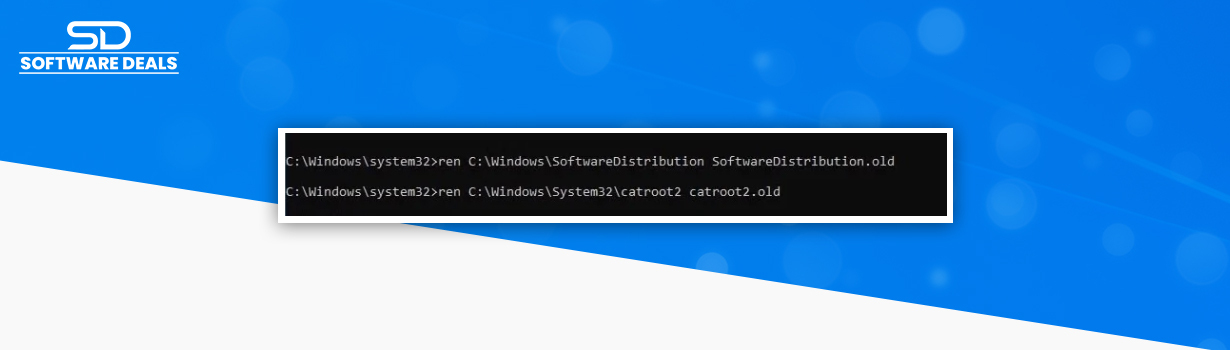
Then, to rename the SoftwareDistribution Folder, execute the following command and press Enter:
- ren C:\Windows\SoftwareDistribution
- SoftwareDistribution.old
- ren C:\Windows\System32\catroot2 catroot2.old
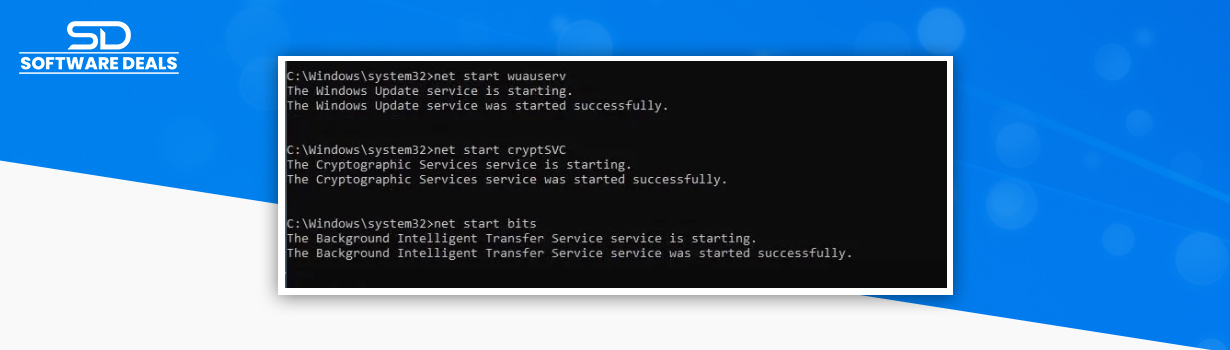
Finally, to start Windows Update Services, execute the following command:
- net start wuauserv
- net start cryptSvc
- net start bits
- net start msiserver
- To save your changes, restart your PC
- Check if the problem is resolved or not
Sol. 2- Delete Software Distribution Folder
- Type services in the search box by pressing Windows Key + R.
- Now enter the command .msc
- Stop the Windows Update service with right-click
- Navigate to the following drive location:
- C:\Windows\SoftwareDistribution
- Delete all of the SoftwareDistribution files
- Right-click the Windows Update service, once more
- Now try to download the previously stuck updates

So, these are two solutions, and we hope that these fixes can help you in resolving the Windows updates stuck problem.
Furthermore, you can try Microsoft Windows 10 Pro 32/64-bit - license - 1 license for your use and if you want it for your business you can contact SoftwareDeals.
SoftwareDeals: Trusted Microsoft partner
In the ever-evolving realm of software solutions, Microsoft stands tall as an unrivaled powerhouse, and our allegiance to this technological titan is unwavering. As a devoted partner, we are fueled by pride in delivering authenticity and reliability through a curated selection of Microsoft's finest.
SoftwareDeals is committed to extending beyond mere provision; we're dedicated to tailoring the best software deals, synchronizing seamlessly with market demands, and fulfilling every client's unique requirements. Join us in embracing excellence, where innovation meets integrity in the world of Microsoft software solutions.
We're thrilled to have had you accompany us on this enlightening expedition through our blog! Our aim has been to offer you rich insights and comprehensive content highlighting the Ways to Fix Windows Updates Stuck at 0%.
Feel free to reach out to us at (800) 983-2471 or drop a line at support@softwaredeals.com. We're eager to further assist you in your journey toward top-notch software solutions!
------------------------------------------------------------------------------------------------------------------------
Welcome to our store, here you can easily Buy MS Windows 11 and other Microsoft products. Here, we take immense pride in presenting the most competitive prices of Microsoft products you'll find in the industry. But it doesn't stop there—our commitment goes beyond cost-efficiency.
With our dedicated technical assistance, rest assured you're not just purchasing software; you're gaining a partner to walk you through every stage, ensuring you receive unparalleled support and guidance. Come explore and experience the difference between exceptional products coupled with top-tier assistance, all under one roof.