null
How To Install Microsoft Project 2021 and 2019

How To Install Microsoft Project 2021 and 2019

September 27, 2023

Elevate Your Business to New Heights with Microsoft Project's Latest Installations!

As organizations strive to stay ahead of the curve, managing tasks, timelines, and resources becomes not just a challenge but a strategic imperative. Enter Microsoft Project, the dynamic solution designed to make your project management endeavors a breeze.

Microsoft Project's latest versions are here to revolutionize the way businesses plan, execute, and accomplish their projects. Whether you're a seasoned project manager or just dipping your toes into the world of efficient task management, these installations are your ticket to superior productivity and streamlined success.

Say goodbye to project bottlenecks and hello to a future where your business operates at peak efficiency. Join us on this journey as we unravel the secrets to installing the latest Microsoft Project versions for businesses.

In this blog post, we are going to tell you the simplest steps to install the latest; Microsoft Project 2021 Professional Download and Microsoft Project 2019.

Steps to install Microsoft Project 2021 and 2019

Step 1- Sign In

  • Click on “Install Office” from the home page

  • Search for the version of MS Project that you need to choose
  • Once you find your project version, click on “Install”

Step 2- Install Project

  • Depending on your browser, click on “Run,” then “Setup,” or Save File

  • When you see the phrase "You're all set! Project is installed now" on your screen, that means your installation process is successfully completed
Note:- these steps are recommended for non-subscription versions of Microsoft Project, but if you have subscription ones or are going to buy online MS Project, then the steps are a bit different.

Now some of you may have Office 365 and want to know if you can install Microsoft Project from Office 365, so the good news is YES. You can install Microsoft Project via Office 365; let’s see how.

Install Microsoft Project through Office 365

  • Step 1- Log in to your O365 portal
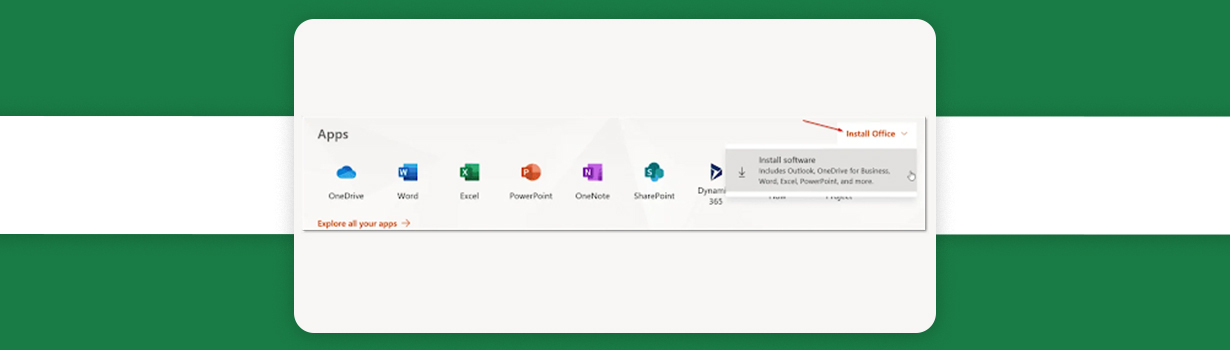
  • Step 2- Click on “Install Office”

  • Step 3- Then click on “Install software”
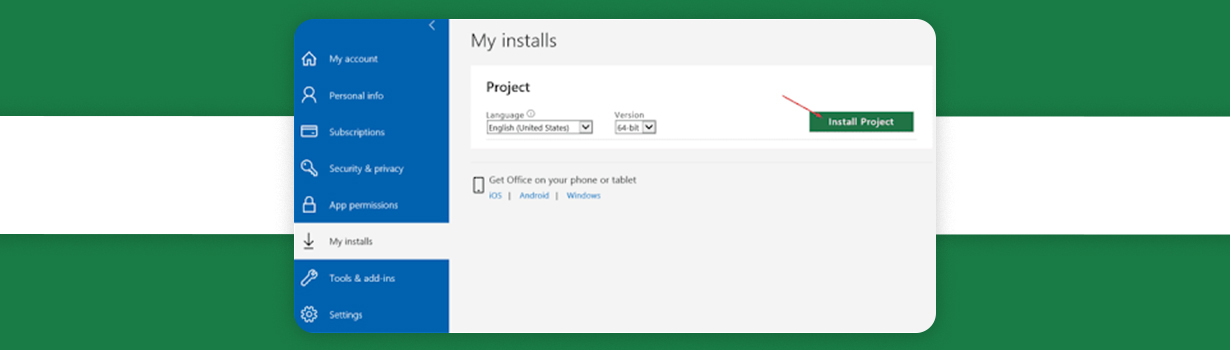
  • Step 4- Find the Project section and click “Install Project”
  • Step 5- According to your preference, select either the 32- or 64-bit version
Now let’s see what are the differences between both the latest versions as it could help you to choose the perfect fit for your business according to your business.

What is the difference between MS Project 2019 and 2021?

MS Project 2019 Vs. 2021

  • Microsoft Project 2021 offers a valuable head start with its extensive collection of pre-built templates, ensuring your project gets off to a strong and efficient beginning.
  • The latest version comes equipped with a reliable and automated scheduling feature designed to boost your productivity and preserve precious time.
  • The new version excels in streamlining task assignments, offering an exceptional level of support for efficient execution.
  • Meeting deadlines is paramount, and in the new version, project managers and their teams can rely on an automatic scheduling feature that sets start and end dates based on task dependencies, ensuring timely project completion.
  • With the new Microsoft Project 2021 version, you can effortlessly visualize intricate schedules using its multiple built-in timelines, simplifying project management.

Thank you for joining us on this informational journey! We hope our blog has provided you with valuable insights into the world of Microsoft and its array of products. Whether you're interested in harnessing the power of Microsoft Project Professional 2019 or exploring the latest cutting-edge versions, we're here to assist you.

Should you have any further inquiries or wish to make a purchase, please don't hesitate to reach out to our dedicated team at (800) 983-2471, or you can conveniently drop us an email at support@softwaredeals.com. Your satisfaction is our priority, and we look forward to helping you make the most of your Microsoft experience.

--------------------------------------------------------------------------------

Welcome to the SoftwareDeals store, your ultimate destination for top-notch software solutions at unbeatable prices. We take pride in offering some of the most competitive rates in the industry, making cutting-edge technology accessible to all. But that's not all – we understand that exceptional software requires exceptional support. That's why our dedicated technical assistance team is here to guide and assist you every step of the way.

Stay at the forefront of all things Microsoft and software-related by immersing yourself in our insightful blogs. When you become a member of our Blog Family, you're not just staying informed – you're joining a community dedicated to fostering innovation and sharing knowledge. 

DirectDeals FAQ

Frequently Asked Questions

Everything you need to know before purchasing software, cloud subscriptions, hardware and IT solutions from DirectDeals.

Is DirectDeals an authorized software reseller? +
Yes. DirectDeals holds authorizations with many leading manufacturers and resells only genuine software licenses, cloud subscriptions, hardware, and enterprise IT products sourced through proper authorized channels. As a service-disabled veteran-owned business with more than 27 years of experience, we are committed to providing legitimate products that meet compliance standards. This approach gives IT professionals and business owners complete confidence whether they are purchasing a single license for personal use or managing volume requirements across their organization.
Can businesses request customer quotations? +
Absolutely. Our experienced business specialists work directly with organizations of all sizes to prepare fully customized quotations that align with your specific business size, compliance requirements, infrastructure setup, and budget goals. Whether you need volume licensing for multiple users, support for enterprise software deployments, or a complete technology refresh, we take the time to understand your current environment and deliver a clear competitive proposal featuring genuine products sourced through authorized channels. To get started simply reach out through our contact form, give us a call, or share details about your setup and objectives. We respond promptly with a tailored recommendation that helps you move forward efficiently while maintaining full compliance and strong cost control.
How quickly are software download delivered? +
Most digital software downloads and activation keys are delivered instantly via email through our Electronic Software Delivery service once your order is verified, often within just a few minutes. For certain products that involve manufacturer-delivered downloads or activation keys, processing may take a bit longer depending on the vendor and the manufacturer. However, we submit your order to the manufacturer immediately upon purchase to expedite the delivery timeline as much as possible. Our support team monitors these orders closely and communicates updates promptly so you experience reliable service and minimal delays whether your delivery is instant or requires manufacturer coordination.
Do I need RDS CALs for Remote Desktop Access? +
Yes. Most organizations that provide Remote Desktop access to multiple users or devices will need Microsoft Remote Desktop Services RDS CALs in addition to standard Windows Server CALs. These Client Access Licenses are required to legally allow remote connections to a Windows Server environment and help ensure compliance with Microsoft licensing rules. At DirectDeals we can help you determine the exact number of RDS CALs your specific setup requires and supply genuine licenses at competitive prices so your remote workforce stays productive and fully compliant without unnecessary complexity or risk. Reach out with details about your current environment and we will guide you toward the right solution quickly.
Do you provide cloud solutions? +
Yes. We provide comprehensive cloud solutions including Microsoft Azure and Microsoft 365 subscriptions along with expert guidance on cloud migration and ongoing subscription management for organizations of every size. Whether you are moving workloads to the cloud for the first time, optimizing existing Azure or M365 environments, or aligning licensing with your security and scalability requirements, our team can guide you through the options so you achieve results faster and with less internal effort. Reach out with details about your current setup and goals, and we will help you identify the right path forward with genuine solutions that support your business without unnecessary complexity.
Can DirectDeals help with enterprise deployments? +
Yes. Our experienced team regularly assists organizations with enterprise-scale software deployments from initial procurement and strategic licensing planning through deployment support, renewals, and complete software lifecycle management. We help IT leaders streamline complex projects, maintain compliance across environments, and control long-term costs so they can focus on strategic priorities instead of day-to-day licensing details. Reach out to discuss your current setup and upcoming initiatives, and we can outline how DirectDeals serves as a dependable partner that simplifies the entire process while ensuring you have the genuine solutions your organization needs.
Why DirectDeals

Fast, Simple, and Reliable Software Buying

Everything customers expect before purchasing genuine software, licenses, cloud subscriptions, and IT products online.

Support

Live support with minimal wait time

Connect with our team quickly for product help, licensing guidance, order support, and business quotation assistance.

Savings

Competitive prices and daily deals

Shop genuine software, Microsoft products, server licenses, cloud subscriptions, and IT solutions at highly competitive prices.