

Still looking for ways to bypass unwelcoming Windows 10 updates disrupting your workflow or bringing unwanted changes to applications? But, for many users, it’s crucial to keep their systems secure without struggling with the frequent, often intrusive feature updates that can bring unexpected compatibility issues and performance drops. This guide will walk you through how to prioritize security-only updates on Microsoft Windows 10 while skipping features updates, giving you more control over your system while keeping it safe and stable.
Whether you’re an individual looking for minimalistic system updates for applications running on Windows 10 environment, or a business entity relying on virtual environments to manage multiple hosts, SoftwareDeals—a registered Microsoft reseller—has got you covered with solutions helping to synchronize your Windows 10 system updates.
Why Focus on Security-Only Updates?
Windows 10 updates include feature updates (bringing new features and design changes) and security updates (focused solely on patching vulnerabilities). While both have their benefits, security updates are essential for protecting your system against cyber threats without the disruptions feature updates can bring. By opting for security-only updates, you can keep your system safe, minimize performance disruptions, and avoid potential compatibility issues with existing software. Below are a few commonly seen concerns associated with the implementation of feature updates-:
Common Concerns and Pain Points
- Compatibility Issues: Frequent feature updates can occasionally cause compatibility problems with older software. Security-only updates help keep your environment stable and compatible.
- Performance Drops: Security updates don’t typically add new resource demands, so you can maintain system performance without additional bloat.
How to Configure Windows 10 for Security-Only Updates
Here’s how you can configure Windows 10 to focus on security updates:
1. Tweak Windows Update Settings
While Windows 10 doesn’t offer a simple switch for security-only updates, you can minimize feature updates by adjusting certain settings.
- Step 1: Go to Settings > Update & Security > Windows Update.
- Step 2: Under Advanced options, select a delay period for feature updates. This won’t block them permanently, but it does push them back, allowing you to focus on security patches.
This approach reduces the frequency of feature updates, giving you more control over when and how updates are applied.
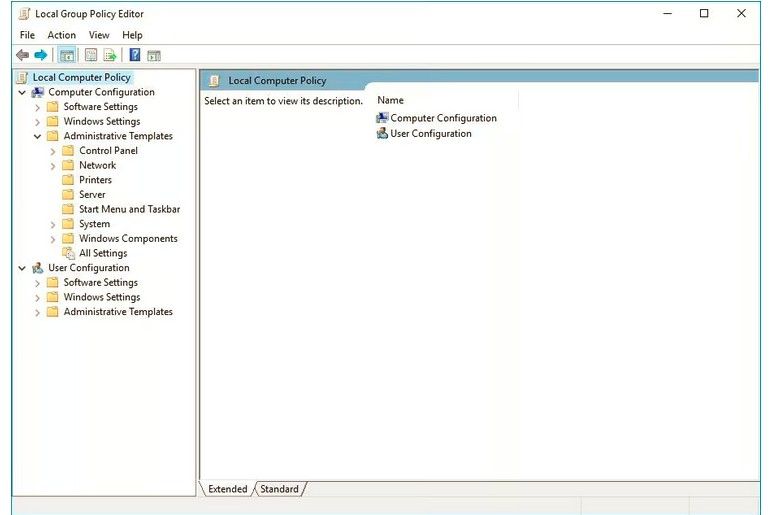
2. Use Group Policy Editor (Windows 10 Pro and Enterprise)
For users with Windows 10 Pro or Enterprise, the Group Policy Editor offers more flexibility.
- Step 1: Press Win + R, type gpedit.msc, and hit Enter.
- Step 2: Navigate to Computer Configuration > Administrative Templates > Windows Components > Windows Update.
- Step 3: Select Configure Automatic Updates and set it to “2 - Notify for download and auto-install.” This gives you control over which updates to install.
- Step 4: Defer feature updates by adjusting the “Select when Preview Builds and Feature Updates are received” setting.
This setup helps you prioritize essential security patches without auto-installing feature updates.

3. Modify the Registry (Advanced Users)
Advanced users can make specific registry adjustments to gain control over updates.
- Step 1: Press Win + R, type regedit, and open the Registry Editor.
- Step 2: Go to HKEY_LOCAL_MACHINE\SOFTWARE\Policies\Microsoft\Windows\WindowsUpdate.
- Step 3: Add a New DWORD (32-bit) Value called “DeferFeatureUpdates” and set its value to 1.


Using this registry tweak helps your system prioritize security over new features. Remember to back up your system before making any registry changes.
Alternative Update Management Tools
For advanced users and businesses, Microsoft offers specialized tools to manage updates more precisely.
Windows Server Update Services (WSUS)
WSUS allows administrators to control updates across multiple devices, making it a good choice for businesses.
- Setting Up WSUS for Security-Only Updates: With WSUS, you can approve only security patches, ensuring that all systems receive critical updates while avoiding disruptive feature updates.
System Center Configuration Manager (SCCM)
For enterprise-grade update management, SCCM provides comprehensive control.
- Using SCCM for Security Updates: SCCM lets administrators schedule security-only patches and defer or exclude feature updates across devices, ensuring maximum stability and security.
Both WSUS and SCCM offer robust control over updates, minimizing potential disruptions.
Key Benefits of Security-Only Updates

By choosing security-only updates, you get several advantages:
- Stability and Compatibility: Security updates are smaller and less likely to interfere with your system’s existing software, reducing the risk of compatibility issues and performance drops.
- Bandwidth Savings: Security updates generally use less data than feature updates, which is helpful for users with limited bandwidth.
- Reduced Disruptions: Fewer updates mean fewer unexpected reboots and interruptions, helping you maintain productivity.
Conclusion: Take Control of your Windows Security Update with SoftwareDeals
By configuring Windows 10 to prioritize security updates, you can create a stable and secure environment that minimizes disruptions and maintains compatibility with your existing software. Tools like WSUS and SCCM are invaluable for enterprise users, while Group Policy and registry tweaks offer effective solutions for individuals.
If you’re looking to streamline your system’s update experience or need help navigating update management, SoftwareDeals offers a range of solutions and support as a registered reseller. With these tips and tools, you can enjoy a secure Windows 10 experience that prioritizes performance, stability, and compatibility—without unnecessary updates.