
Microsoft Visio, we have already discussed a lot on this amazing Microsoft release. But if you are new to our site, let us introduce you to Microsoft Visio; it is an excellent visual tool for individuals and organizations to organize and form visual graphs, charts, and other graphic content to represent processes and information to the audience.
Mac Operating system gives us a lot as compared to regular PCs. A Mac provides a smooth OS, security, no need for upgrades, and much more. And due to these wonderful qualities, people are speedily switching towards Mac from PC.
Before we go into whether you can run Visio Professional 2021 and other versions on Mac or not, let me tell you that; Microsoft Visio has never been released for Mac. Since the Mac OS has qualms about incorporating other applications or programs into their devices, users can download Windows 10 or the latest Windows 11 to their Mac OS devices.
Unfortunately, most users don't know that they can actually run Microsoft Visio on Mac, and in this blog, we will discuss that; stay tuned!
Before getting deep into how you can run Microsoft Visio on your Mac OS, let's know the importance of Visio in today's business world.
Importance of MS Visio in the Business World
Today every business needs a tool that can make wonderful diagrams, charts, images, and multiple designing work so that they can effortlessly explain their product or services to their client and target audience.
But not everyone can spend a big portion of their time doing this, so what is the solution? Yes, you are guessing it right. It is the one and only Microsoft Visio that can help you with your demanding aspects.
Microsoft Visio comes in many versions, as Microsoft includes new features and functions and releases a new Visio. Now let's see the other benefits that Visio provides you and help you be more creative.
Benefits of Microsoft Visio
- Improved communication: Visio makes it easy to create clear, concise diagrams and flowcharts that can be shared with others to help communicate complex ideas and processes.
- Better collaboration: Visio provides collaboration features that allow multiple team members to work on the same diagram at the same time, regardless of their location.
- Increased productivity: Visio's drag-and-drop interface and a vast library of pre-built shapes and stencils make it easy to create diagrams quickly and efficiently.
- Enhanced decision-making: Visio helps businesses make better decisions by enabling them to visualize and analyze data in a way that is easy to understand.
- Cost-effective: Visio is a cost-effective solution for businesses that need to create diagrams and flowcharts regularly, as it is less expensive than other high-end design tools.
- Customizable: Visio can be customized to meet the specific needs of different businesses, enabling them to create diagrams and flowcharts that are tailored to their unique requirements.
- Integration with other Microsoft tools: Visio can integrate with other Microsoft tools, such as Excel and SharePoint, to make it easy to import and export data and collaborate with other team members.
How Can You Run MS Visio on Mac
The Mac OS cannot allow users to directly access the Microsoft Visio application on the device since Microsoft has no desktop version available for Mac users; there are multiple possibilities for users to generate or use the Visio. The below-given part is installing Windows 10 on a Mac device to enable users to operate Microsoft Visio to its full potential.
Step 1 – Download the "Parallels Application"
| Parallel is not an operating system but rather a software program or application. Because Visio runs on Windows, the Mac device does not hold its visual integrity. |
To take advantage of Microsoft Visio, Mac users can download the Parallels application to their Mac devices. It allows users to set up Windows and download Microsoft developments, including Internet Explorer and MS Office applications.
Step 2 – Set Up Parallels
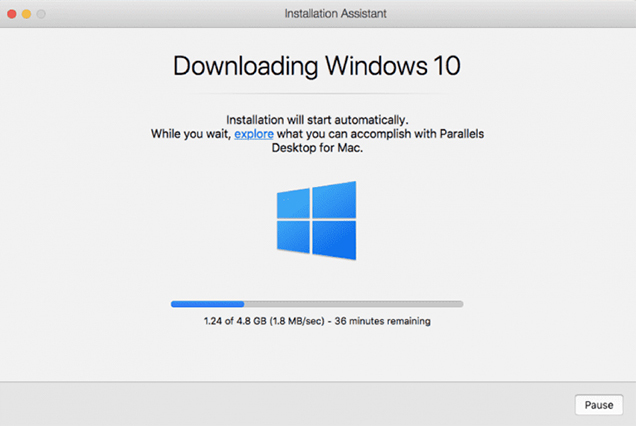
After downloading the Parallel application, run the setup wizard and wait for Windows 10 to be installed on the device. Windows 10 is free to use without installing a product key unless the user wishes to customize or change the operating system.
To launch the installer, click the Install Windows button, and the Parallels application will begin downloading Windows 10 for the Mac device.
Step 3 – Acquire Microsoft Visio for Windows
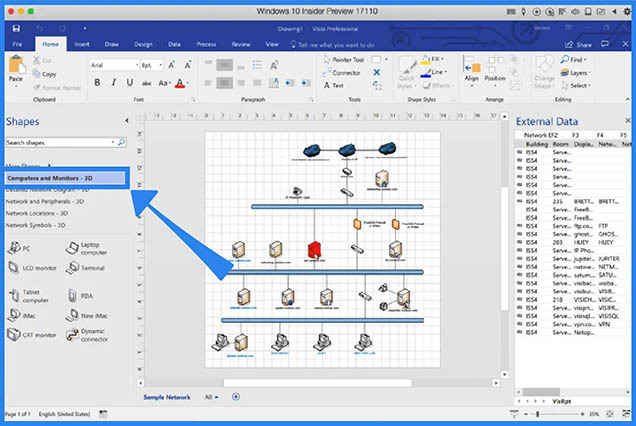
After installing Windows 10, users can purchase and install Microsoft Visio, sign in with an active Microsoft 365 account, or select Get Office from the Start menu. Following the purchase, the user can install Microsoft Visio on a Mac device like a Windows PC.
With the map of how to use Microsoft Visio on Mac, you have also learned the benefits and importance of Visio in your business. So, don't waste your precious time; get Microsoft Visio now for your business and see the exponential growth in your communication process.
Need Help?
To put it simply, Visio 2019 Download and other versions (can choose accordingly) are important for every business.
SoftwareDeals is the ideal platform for purchasing any Microsoft product. All Microsoft products are available at competitive prices. Additionally, we have 24+ years of experience in the domain, so one can easily trust us.
Stay Connected & Thanks For Paying Attention!